Getting Original Designs Out of AI Coding Agents
A practical workflow for creating more original websites with AI coding agents: collect strong references, explore concepts cheaply, choose fonts deliberately, and polish what matters.
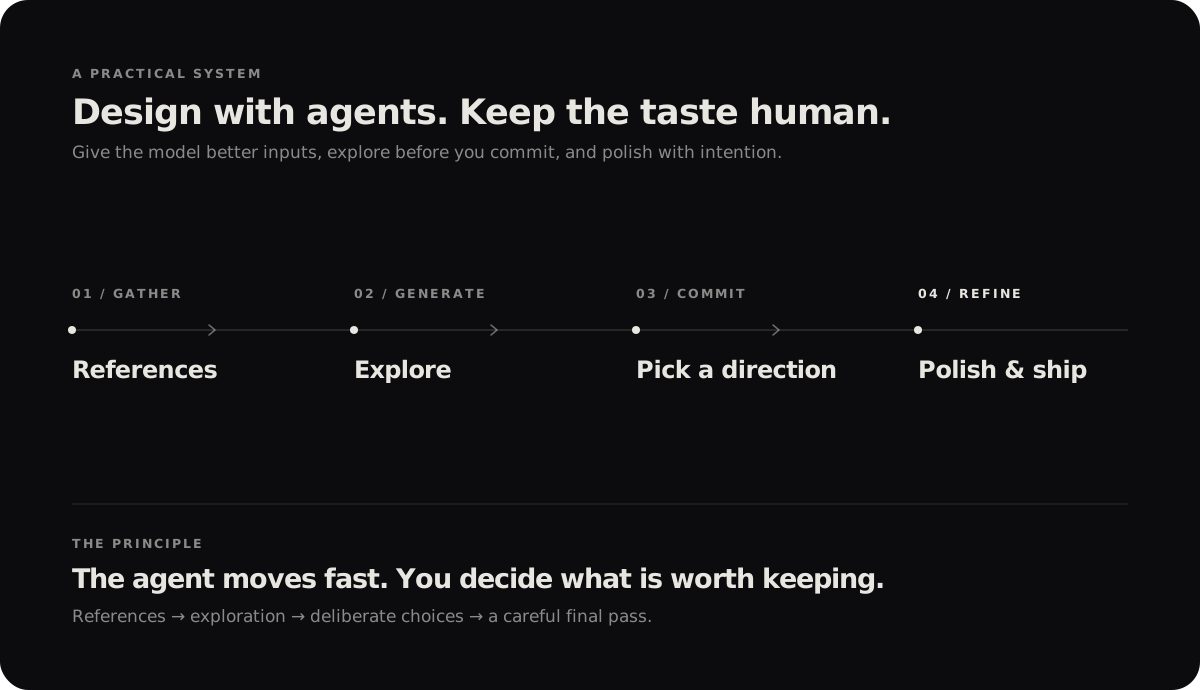
A better prompt can help, but it won't magically give you a great website. The bigger difference is the process around the model: what you show it, when you let it explore, and how carefully you review the result.
This is the workflow I use to create more distinctive websites with AI coding agents without wasting time—or tokens—polishing the wrong idea.
The setup
For each project, I create a new directory with four folders:
my-project/
├── references/
├── concepts/
├── fonts/
└── assets/
Each folder has one job. References hold what I want to learn from. Concepts hold early directions to compare. Fonts contains the typefaces I picked. Assets holds the material the final website will actually use.
That separation keeps the agent's context organized and makes it easier to explore without mixing inspiration with the finished work.
Start with references
This is the most important part of my setup. Don't give an agent only a sentence like “make me a modern, creative website” and expect something original. That brief leaves it too much room to fall back on familiar patterns.
Instead, I collect references that show the details I care about:
- Screenshots: specific sections, not only full-page screenshots. Save the hero, navigation, footer, unusual layouts, typography, and interactions that catch your eye.
- URLs: live websites are useful for understanding how a page behaves and how its sections fit together.
- Code snippets: when the implementation is public, include the relevant code or repository.
- Videos or GIFs: useful for interactions and motion, as long as your model can actually inspect them. Otherwise, add screenshots or explain what happens frame by frame.
- Color palettes: I keep a small file of palettes in this folder. Color Hunt and Coolors are good places to explore more.
One extra habit makes the references much more useful: write a short note about what you like in each one. Maybe it's the oversized typography, the way the grid breaks, or a transition that makes the page feel alive. The goal is to communicate a design idea, not ask the agent to copy a website wholesale.
Explore before committing
Next, I ask the agent to build three to five distinct concepts in the concepts/ folder. I want different directions—not five versions of the same template with different colors.
At this stage, I keep the code intentionally lightweight. Each concept should be runnable and real enough to judge in a browser, but it doesn't need a production-ready component system, backend, or elaborate architecture. We're testing ideas, not shipping the final site.
A prompt like this is a useful starting point:
Review the material in /references and create five distinct design concepts
in /concepts. Give each one a different art direction, layout, typography,
color palette, and visual rhythm—not just a different accent color.

Keep each concept runnable but lightweight. Focus on the visible experience;
avoid backend work and premature production architecture. We'll choose a
strong direction before polishing or combining anything.
I compare the concepts, choose the one with the strongest idea, and then explore two or three more variations of that direction. Only after that do I start building it out properly.
This stage saves a lot of rework. It's much cheaper to reject an idea when it is a small prototype than after an agent has built an entire site around it.
Choose fonts deliberately
Typography is one of the clearest differences between a considered design and something that feels generically AI-made. The wrong font can flatten an otherwise good idea; the right one can give the page a recognizable voice.
I prefer to choose the fonts myself and put the actual font files in fonts/, rather than letting the agent pick whatever it reaches for by default. Think about personality, readability, the available weights, and how the font works at both large and small sizes. Check the license before using a font in a published project, too.
Some places I look:
I do the same with color: I choose a palette deliberately and keep it with the references, so the agent has a clear direction instead of inventing one from scratch.
Polish in the right order
Once I've chosen a direction, I move from exploration to refinement. I don't ask the agent to “make it perfect” in one giant pass. I work through the page in layers.
1. Make sure it works
Test the basic experience first: navigation, links, buttons, forms, and the mobile layout. Check that the purpose of the page is clear and that common tasks are easy to complete. A beautiful interface is still a bad interface if people can't use it.
2. Fix consistency
Then I look for the small things that make a page feel unfinished: inconsistent spacing, mismatched padding, awkward line lengths, uneven alignment, type sizes that don't belong together, strange image crops, and sections that feel out of proportion.
3. Drop generic patterns
Now I look for the familiar signs of “AI slop”: a predictable hero, cards for absolutely everything, decorative gradients that add nothing, generic icons, and the same rounded rectangles repeated across the page. None of these patterns is automatically bad—but they shouldn't appear just because the model defaults to them.
I ask what each element is doing, then replace anything that doesn't serve the content or the design direction. This is where a design skill like Impeccable can help with critique and focused polish, but the final judgment still needs to come from a person.
Let motion earn its place
Animation is a big part of how a website feels. It can guide attention, explain a relationship, and make an interaction satisfying. It can also slow the page down or turn the whole experience into a distraction.
I usually work on motion after the structure, typography, and spacing feel solid. I look for ideas in real websites, motion references, and component libraries such as React Bits. For implementation, I often use GSAP, depending on what the interaction needs.
I don't add movement just to make a site look expensive. Every animation should have a reason, work well on different screen sizes, and respect reduced-motion preferences. If it makes the page harder to use, it doesn't belong.
Before publishing
I take one final pass through the whole site and look for things I have become too familiar with to notice: a broken link, an odd mobile breakpoint, a barely misaligned element, a section that feels too empty, or an interaction that behaves differently than expected.
I also ask friends for feedback. Instead of only asking whether they like the design, I ask what they noticed first, what confused them, and whether anything felt awkward. Fresh eyes often catch problems that I have stopped seeing.
Then I make the last small adjustments and publish. It's tempting to keep tweaking forever, but at some point the page needs to meet real users.
The tools I use
My main setup is OpenCode as the coding agent and Impeccable as a design skill. For inspiration, I use Cosmos, Pinterest, and Mobbin. For motion, I reach for GSAP and React Bits when they fit the job.
The models I've used for this workflow include Xiaomi's MiMo V2.6 Pro, MiMo V2.6 Flash, and GLM-5.3-Flash. I chose them as relatively low-cost options for my setup, but model pricing and availability change. You don't need these exact tools. This workflow can work with any coding agent and a capable model; the important part is the references, the staged exploration, and the quality of your review.
Credits and inspiration
A few people whose work has helped me learn and think more carefully about web design and interaction:
-
Joffrey Spitzer — especially his layered zoom scroll tutorial and draggable product grid tutorial.
-
Chase AI — watch the video on YouTube.
-
Omar Albeik's blog — Omar is a friend, and his work is another source of inspiration.
The point isn't to collect references until a design makes itself. It's to build a clearer taste, give the agent better material to work with, and make deliberate choices at every stage.